

Forecasts API authentication
Create and revoke API tokens, what a token can see, and how MCP clients sign in.
Send a Novi API token as a bearer token on every request. The token acts as you: it sees your company’s plans and data and nothing else.
GET /forecasts/api/v1/me HTTP/1.1Host: <your-company>.novilabs.ioAuthorization: Bearer <your-token>API tokens
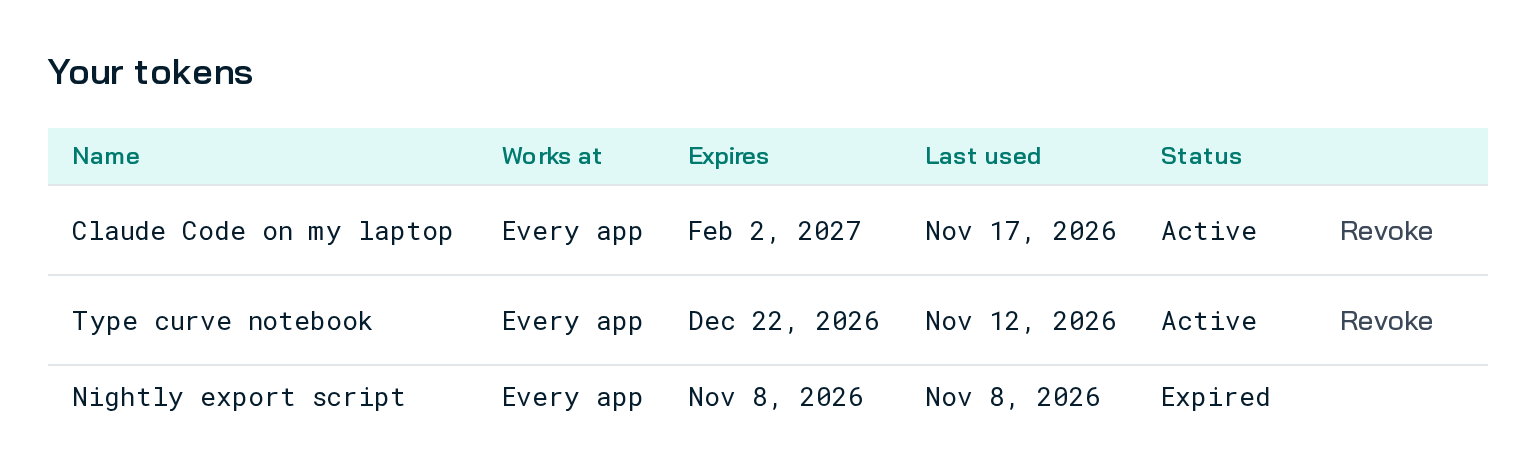
Section titled “API tokens”- Create a token in the Forecasts app under Settings, then API tokens.
- Who can create one: a user with the Access MCP permission, which your company’s Novi administrator grants through a role. Without it, API tokens doesn’t appear in Settings.
- Revoke a token from the same page. Anything using it stops working within two minutes.
Lifetimes and safe storage: Compare credentials. Format and one-time display: Novi API token.
Access
Section titled “Access”| You need | What happens without it |
|---|---|
| A token that is current, not revoked, for an active user | The request is not authorized. Create a new token |
| The Access Forecasts permission | The API denies access. Ask your Novi administrator |
- Every company’s plans, forecast jobs, exports, shares and saved documents are its own. Another company’s record looks the same as one that doesn’t exist, and nothing you send can select another company.
- What each error looks like: Errors and limits.
MCP clients and Novi sign-in Preview
Section titled “MCP clients and Novi sign-in ”MCP clients such as claude.ai and Claude Desktop can sign you in with your Novi login instead of a pasted token, at
https://<your-company>.novilabs.io/forecasts/api/mcp.
- To approve a connection, you need the Access MCP permission and access to Forecasts.
- The sign-in works only on that MCP server, at your company. It does not work on the REST API.
- No token, however it was made, can create or manage other tokens.
Steps: Novi sign-in for assistants. Setup: MCP server and Claude skill.
Service tokens Planned
Section titled “Service tokens ”Every token today acts as one person, with that person’s full access. Read-only tokens for partners and pipelines, not tied to a person, are planned.